If you've ever landed on a page in a foreign language and seen a prompt to translate it, you've used automatic translation. Most browsers and apps run some version of it. That's raised the bar for localization teams: content now needs to go out fast and still read like it was written for the market it's landing in.
The automatic translation your browser runs, usually via Google Translate, AI, or a similar service, is fast. It's also not always good. People often conflate automatic translation with machine translation, though the two aren't the same thing, as we'll get into below. Either way, automatic translation can still miss nuance, idiom, and specialized terminology.
This guide covers how to get translation speed and consistency without giving up quality: what automatic translation actually includes, where it breaks down, and a step-by-step path to implementing it, whether you're evaluating MT strategies or integrating automation into a CI/CD pipeline.
What is automatic translation?
Automatic translation is the end-to-end automation of a translation workflow, from content detection through machine translation, routing, quality assurance, human review, and publishing. It's broader than machine translation, which only produces the raw output. Automatic translation is the system that moves that output through quality gates and into production without manual handoffs. This is the same thing people usually mean by translation automation: the mechanical steps of translation run on their own, and a human steps in only where the content actually needs one.
It has several key components:
- Machine translation (MT): Neural models that generate the initial translation.
- Routing logic: Automated decision-making about where content should go (MT-only, MT + human review, full human translation).
- Quality assurance (QA): Automated or semi-automated checks for style, terminology, punctuation, placeholders, and format.
- Human review: Editors performing MTPE (machine translation post-editing) or full review.
- Publishing automation: Automatically pushing approved translations into the right product environment or CMS.
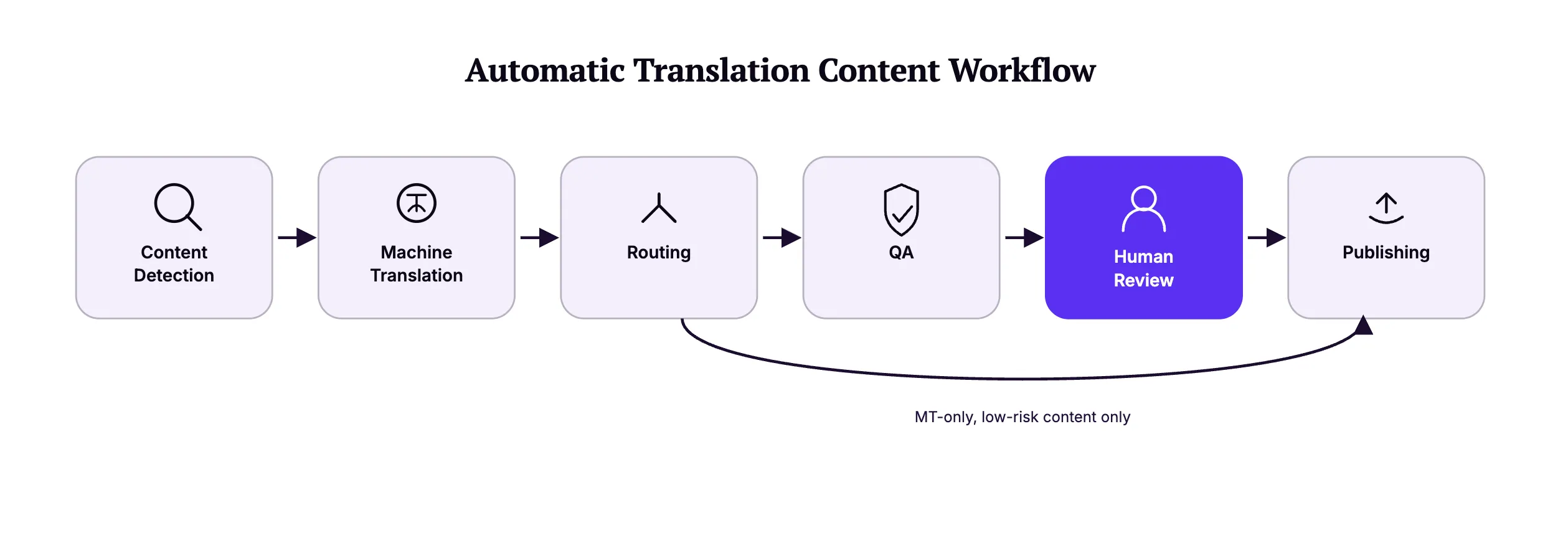
Automation matters for scaling localization teams because it removes the ceiling on volume. A team that can only push translations through manual handoffs will always be capped by headcount. Automate the handoffs, and language coverage stops being a staffing problem, as long as human oversight stays in place where the content actually needs it.
Automatic translation vs. machine translation
Machine translation is the engine. Automatic translation is what you build around that engine to make it usable at scale.

MT itself has evolved from rule-based systems to statistical MT to neural machine translation (NMT, models that use deep learning to predict translations based on context rather than fixed rules), with accuracy improving at each step. But raw MT output still isn't enough for enterprise use on its own.
Automatic translation is the workflow that fills that gap: routing, review, QA, and publishing layered around MT so output is governed and consistent, not just fast. Treat MT as one input to that workflow rather than the whole of it, and you can swap engines by domain, language pair, or quality need without rebuilding the process each time.
Types of MT models
Machine translation isn't one-size-fits-all. A few deployment models cover most needs:
- Cloud MT. Fast to implement, with lower costs. It continuously improves, but since it's in the cloud, it's best for teams without heavy security constraints.
- Private/on-premise MT. Highly customizable and ideal for regulated industries or highly sensitive content, since data never leaves your environment.
- Hybrid models. A mix of cloud and private MT, useful for teams with mixed content risk levels.
- Adaptive or on-device MT. These models learn from user behavior, which makes them common in mobile apps and support widgets.
Benefits of automatic translation
It's fast, and it still needs manual intervention to get to publish-ready in most cases. Here's what teams get in exchange for that intervention.
[[Brief 4]]
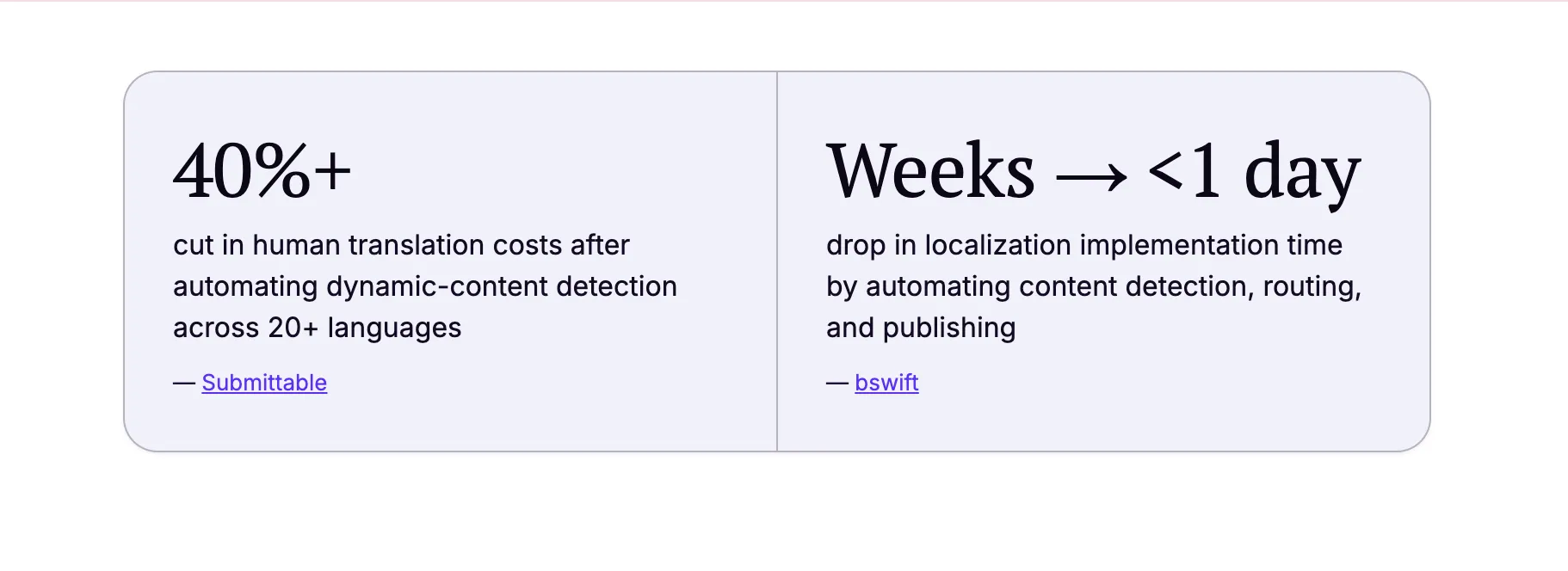
By the numbers
- Submittable cut human translation costs by more than 40% after automating dynamic-content detection across 20+ languages.
- bswift reduced localization implementation from weeks to under a day by automating content detection, routing, and publishing.
Speed & scalability
The most obvious benefit is speed. You can translate hundreds of pages within seconds. QA is still necessary to ensure accuracy in many cases, but the entire process still takes a fraction of the time manual translation would.
Improved consistency
Automatic translation lets you build glossaries, terminology rules, and routing logic, which keeps quality uniform and prevents the same expression from being translated differently across pages.
Lower cost per word
You'll still need human intervention to ensure accuracy, but labor and the costs that come with it drop significantly.
Submittable, a cloud-based social impact platform, used Localize's automatic translation solution to expand its web app into 20+ languages. With a single code snippet and automatic detection of dynamic strings, they enabled multilingual support for dynamically generated forms and pages. The result: faster time-to-market and a leaner translation budget.
Faster multilingual publishing
Automated content detection and publishing automation eliminate the slow, manual steps that typically hold localization teams back. Instead of waiting for developers to extract files or manually push updates, translations flow directly from workflow to production, so your team can release content in hours, not days or weeks.
Better use of human editors (higher-value tasks)
Linguists often lose time to repetitive tasks that automation can eliminate entirely. Instead of fixing formatting issues or processing bulk strings by hand, they can focus on nuance, accuracy, and quality.
Challenges and limitations
Automatic translation still has real limits worth planning around:
- Accuracy variation. Quality depends on the language pair, content type, and domain specificity.
- Lack of context. MT can misinterpret strings without surrounding text or metadata.
- Hallucinations. NMT models occasionally generate plausible but incorrect translations.
- Confidentiality and security. Route sensitive content through compliant environments only.
- Over-automation. Without governance, teams may send high-risk text through MT-only workflows, introducing compliance or brand risks.
How to implement automatic translation
Here's a step-by-step plan for capturing the benefits above while limiting the risks.

1. Assess your needs and content types
Start by looking at your content types. Identify high-risk and high-volume content, and decide where MT-only is acceptable versus where human review is mandatory. Sensitive, high-risk content will almost always need a human in the loop. Then map your current bottlenecks: inconsistent terminology, slow dispatching, manual handoffs.
2. Choose the right automatic translation tools and platforms
Evaluate tools on area of expertise, language pairs, and quality benchmarks. Look for a translation management system (TMS) that can automatically send content out for translation, track it, apply the right rules, and move it through each step. It should also plug directly into the systems you already use, like your CMS, code repository, or product pipelines.
3. Integrate automatic translation into existing workflows
Set rules so the system knows when to use MT-only, when a human should post-edit the machine output (MTPE), and when a human should translate from scratch. Build a glossary and style guide so terminology stays consistent from day one, and where possible, turn on automated detection so the system finds and routes new or updated text for translation without anyone copying and pasting.
4. Scale across teams & content
Once your tool and content priorities are set, start small rather than rolling out everywhere at once: translate marketing content first, then product UI, then customer support materials, then documentation. Set rules for how translations get approved and who signs off before anything goes live.
5. Monitor, optimize, report
Track MT quality and post-editing time, adjust MT engine selection based on the results, and report on business outcomes like cost savings, multilingual SEO performance, and release cycles.
Best practices for successful automatic translation implementation
A few practices help teams get more value out of each stage:
- Combine automation with human expertise. MT + human review is still the gold standard for most use cases.
- Customize translation engines for domain-specific terminology. This improves consistency and reduces edits.
- Retrain and update MT models. Domain drift affects quality, so ongoing improvement matters.
- Ensure compliance with privacy regulations. Use private MT or secure processing for sensitive text (GDPR, SOC2, HIPAA).
A few technical considerations matter too:
- Variables and placeholders. Protect markup, tags, and product variables to avoid breaking UI elements.
- HTML and structured content. Make sure the MT engine and TMS support embedded formatting.
- APIs and CI/CD. Automate translation directly in product pipelines using connector APIs.
- Dynamic and contextual strings. Provide metadata or screenshots when possible to improve MT accuracy.
Metrics and how to measure success
A handful of metrics tell you whether your implementation is working:
- MT acceptance rate. The percentage of MT output used without edits. Higher is generally better, but it depends on content risk. High-risk content will naturally see a lower rate.
- Post-edit time. How much time editors spend correcting mistakes. A high number signals problems with your MT tool or setup.
- Quality scores. LQA/MQM scores (structured frameworks for scoring translation quality by error type and severity), error types, and severity.
- Cost metrics. Cost per translated or published word.
- Business KPIs. Time-to-market, international traffic, adoption in new markets, and localization backlog.
Bswift, a SaaS platform for employee benefits administration, used Localize to replace a manual, configuration-heavy translation process. By automating content detection, routing, and publishing, they cut implementation from weeks to under a day. That let them support more languages faster without adding engineering effort, and it improved time-to-market directly.
Choosing the right tools and vendors
MT vendors are easy to find and hard to tell apart from a feature list alone. Here's what actually differentiates them:
- MT engine capabilities. Neural architecture, language coverage, quality benchmarks, and customization.
- Customization vs. out-of-the-box. Some industries (medical, legal, FinTech) require domain-tuned models.
- Security & compliance (GDPR, SOC2, and HIPAA). Critical for healthcare, finance, legal, or enterprise SaaS.
- Cost models. Per character, per-request, enterprise seats, or consumption-based pricing.
Other features worth looking for:
- Automated routing.
- Glossary enforcement.
- Review workflows.
- Connectors to CMS/product.
- API automation.
- Quality estimation (automated scoring that predicts translation quality without a human reviewer, used to flag content that needs review before it publishes).
How Localize supports automatic translation
Localize is a no-code translation solution for software platforms that uses AI translation to translate your web app, UI, website, emails, help docs, and more. It's built with features made specifically for automatic translation workflows:
- Automated content detection. Localize automatically identifies new or updated text for faster translation.
- AI translation + human review workflows. Supports MT-only, MTPE, and human-only routes, so you can use it for all content types.
- Glossary enforcement. Ensures terminology consistency across markets.
- Connectors and integrations. Links to your CMS, code repository, and marketing tools.
- Publishing automation. Deploys approved translations directly into product or web environments.
These capabilities help teams build scalable, predictable translation pipelines without losing quality control.
ContractPodAI, a legal platform supporting complex, multilingual applications, needed a way to automatically detect new and updated content. They used Localize to route translations through a mix of AI and human review. That let them publish approved content without manual handoff and scale language support across multiple applications while maintaining quality, security, and accuracy.
Quick-start checklist and final takeaways
If you're unsure what to do first, start here:
- Define content types and quality requirements.
- Select MT engines based on benchmarks.
- Set up terminology and style resources.
- Configure automated workflows.
- Establish review and QA processes.
- Monitor MT performance and adjust.
- Document governance and ownership.
Automatic translation doesn't mean turning on your MT tool and letting it run unsupervised. It means building a repeatable, scalable system that combines automation with human expertise. With the right workflows, tooling, and governance, localization teams can deliver multilingual content faster, with higher consistency, at a significantly lower cost.
Want to see what automatic translation looks like in practice? Learn how Localize helps teams combine AI translation, human review, and workflow automation to scale multilingual content without sacrificing quality and control.

%20(1).jpg)