Your SaaS product is ready for a global audience long before your localization workflow is.
Maybe you’ve started seeing signups from Germany, Brazil, or Japan. Sales is having conversations with prospects in new markets. Marketing wants to launch localized campaigns to support demand, while product teams are shipping new features every few weeks.
Then the wall hits.
Every new interface string needs to be extracted for translation. Marketing waits on engineering to localize campaign assets. Developers manage translation requests instead of building features. By the time localized content is ready, the release has already shipped — and your international customers got the English version again.
Translation in and of itself isn’t the problem. The workflow behind it is.
Modern web applications generate a constant stream of new content, from interface strings and notifications to onboarding flows, feature updates, and personalized user experiences. Spreadsheets, manual exports, and file-based handoffs can't keep pace with a weekly release cycle.
Web app localization software solves that by integrating translation directly into how your product and content teams already work. In this guide, we'll cover what that software actually does, why traditional workflows break down at scale, and what to look for when evaluating your options.
What is web app localization software?
Web app localization software manages the end-to-end process of extracting, translating, and publishing content across a dynamic application, not just static pages.
A web app generates content at runtime: user interface strings, error messages, onboarding flows, and dashboard labels. That content lives in your codebase, your database, and your API responses, and doesn’t simply sit around in an HTML file waiting for translation.
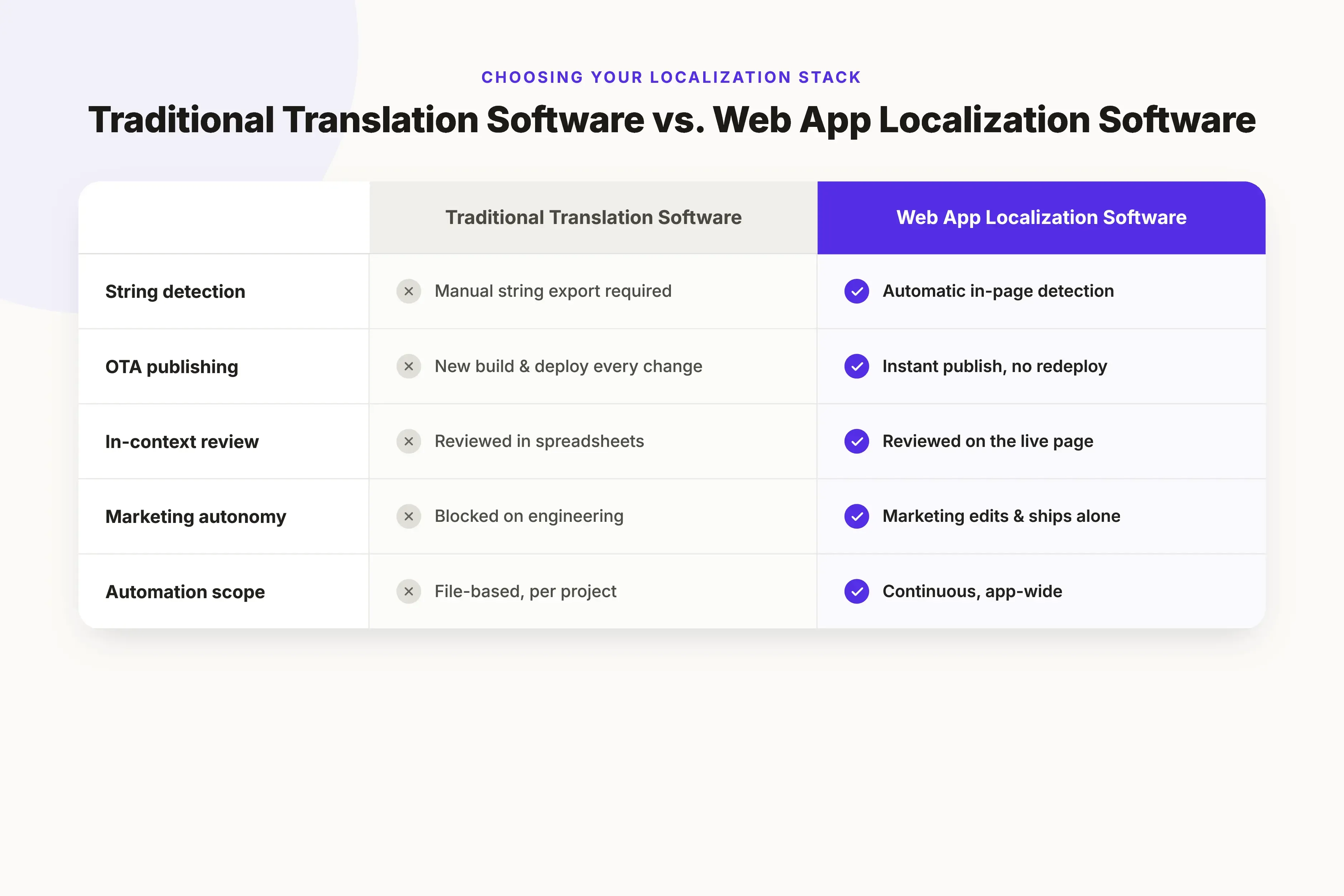
Traditional tools struggle here. Without direct application integration, keeping translations current becomes a manual coordination problem that compounds with every release.
Web app localization software integrates directly with your application to detect new strings, send them for translation, enable in-context review, and publish updates automatically — without manual exports or heavy engineering involvement.
It's also worth being precise about what it isn't:
- Standalone translation management systems (TMSs) manage translation projects and assets, but often rely on manual imports, exports, or custom integrations to get content into your application.
- Website translation proxies serve alternate page versions for static marketing sites. They break on dynamic or personalized application content.
- Manual localization workflows — spreadsheets, exported files, emailed handoffs — work at small scale and fall apart the moment your product starts shipping weekly.
Why SaaS teams struggle with web app localization
When companies release a new feature, product, or campaign, localization often remains a separate workflow that depends on manual handoffs between engineering, marketing, product, and translators.
The result is slower releases, inconsistent user experiences, and growing technical debt. Here are four of the biggest challenges.
Dynamic content breaks traditional tools
Unlike static websites, web applications generate new content all the time. Interface labels, notifications, onboarding flows, feature flags, user dashboards, and personalized experiences can all introduce new strings that need translation.
Traditional localization methods often rely on manually identifying these changes before sending them for translation. As products grow and release cycles become more frequent, keeping track of every new or updated string becomes increasingly difficult.
Localization creates unnecessary developer work
In a traditional workflow, the path from “we need this translated” to “it’s live in German” runs through engineering.
A developer has to identify the string, tag it, export it, and eventually re-import the translated version. Sooner or later, this turns into a bottleneck, and localization falls behind by design.
Marketing moves faster than traditional localization workflows
In the week before a product launch, campaign strings, landing page content, and in-app messaging can change every day. A file-based workflow simply can’t work at that speed.
The result is that marketing either has to wait on engineering or deliver campaigns in only one language. Neither option is good.
Quality issues are discovered after launch
Most teams review translations in a spreadsheet or a TMS dashboard, disconnected from the live environment where the text will actually appear.
Issues with text expansion, broken layouts, and contextual errors surface after launch, when fixing them is expensive.
How web app localization works: the core workflow
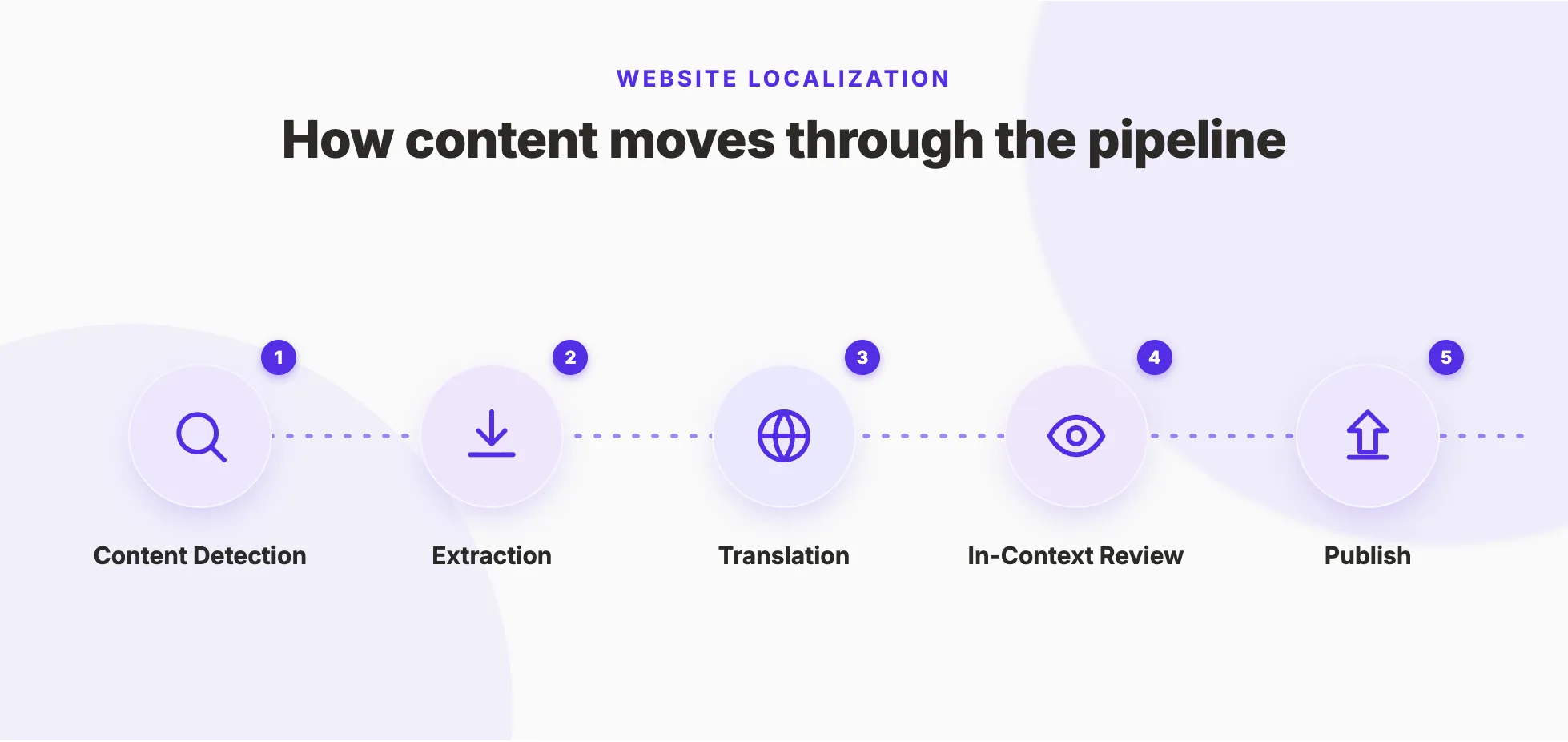
An effective localization workflow removes repetitive manual work while ensuring new content reaches users in every supported language as quickly as possible. Modern web app localization software automates much of this from the moment new content is created. Implementations vary by platform, but the core stages are consistent.
Stage 1. Content detection
The software identifies translatable strings in your application through an SDK installed in the codebase, an API integration, or a proxy layer sitting in front of your app.
That’s because it needs to catch strings wherever they live: hard-coded in components, loaded from a backend, or generated dynamically at runtime. If detection misses strings, they never make it into translation.
Stage 2. Extraction
The system pulls detected strings into a translation management environment without developer intervention. The goal is zero-touch extraction. In other words, the new strings should get picked up automatically as your product ships without requiring a manual export step.
Stage 3. Translation
Only after detecting and extracting new content does the workflow move to the translation stage. This pipeline usually involves a few steps, such as machine translation, human review, or a hybrid of both, depending on the content itself.
Glossaries and style guide controls help maintain product terminology consistent across languages and ensure that the marketing copy matches your brand voice in every locale.
Stage 4. In-context review
Reviewers QA translations inside the live or staging environment, seeing exactly how a string renders in context.
Text too long for a button? Terminology that doesn’t read naturally? Copy that makes sense in English but loses meaning in Japanese? This is where you catch all these errors.
Stage 5. Publish
Approved translations go live without a deployment. Over-the-air (OTA) publishing pushes updates directly to your application, so your release cycle doesn't gate localization.
Marketing can update campaign strings and product can ship UI changes, but neither team needs to wait for engineering to cut a release.
Handling dynamic content and campaign strings
Traditional localization workflows struggle with dynamic content for a structural reason. Static websites are predictable — translate a page and it may not need updating for months. Web applications work differently. They continuously generate new content that often doesn't exist until the application is running: personalized dashboards, feature flags, onboarding messages, account notifications, product recommendations, and customer-specific interface elements. Manual workflows and page-based translation tools can't detect these strings consistently, which means they stay in English while everything else gets localized.
Marketing faces the same problem at a different speed. Product launches, feature announcements, seasonal campaigns, landing pages, and A/B tests all move faster than traditional localization processes can handle. When every campaign requires a developer to extract strings and deploy an update, marketing loses the ability to launch across markets simultaneously.
Modern web app localization software handles both by monitoring for new and updated content continuously. New strings enter the localization workflow as soon as they're detected — translated, reviewed, and published without a manual handoff. Product teams ship without localization backlogs. Marketing teams launch multilingual campaigns without waiting on an engineering ticket.
What to look for in web app localization software
Not every localization platform solves the problem this article has been describing.
Some platforms help you manage translations. Others help you build a localization workflow that keeps pace with product releases, marketing campaigns, and business growth.
For most SaaS companies, the biggest challenge is reducing manual work while giving engineering, product, and marketing teams the ability to move faster together. Start your evaluation there — not with translation quality. Most modern platforms translate accurately. The real differentiator is how well a platform fits into the way your teams build, release, and update your product.
Does it integrate with your existing tech stack?
If a platform requires your development process to adapt to it, it's likely creating more work than it's removing.
The best localization software fits into your existing development process rather than forcing you to change it. Look for SDKs, APIs, or integrations that work with your application’s architecture and automate localization without requiring significant engineering effort.
How much of the workflow is automated?
If developers are still exporting files manually, your localization workflow won't scale. Look for platforms that automatically detect new content, route it for translation, and publish approved updates with minimal manual intervention.
Can product and marketing teams work independently?
Localization shouldn’t become an engineering bottleneck. When marketing has to wait for engineering every time they launch a campaign, the workflow is already broken.
Product teams need reliable workflows for application strings, while marketing teams need the flexibility to launch multilingual landing pages, campaigns, or announcements on their own timelines.
The right platform supports both without requiring separate tools or constant developer involvement.
Does it help maintain consistency across languages?
A bigger, more successful app also means more content to localize. Features like translation memory, glossaries, and style guides help ensure terminology remains consistent across product interfaces, support documentation, and marketing content.
Can reviewers see translations in context?
Reviewing translations outside the application almost guarantees that you’ll discover usability issues too late.
In-context review allows translators and reviewers to see exactly how content appears inside the product, making it easier to identify layout problems, broken placeholders, awkward wording, and other issues before users encounter them.
How quickly can translated content reach users?
The faster translations move from approval to production, the easier it is to keep the pace with product releases and marketing campaigns.
Platforms that support OTA delivery or similar publishing methods allow teams to release the updated translations without waiting for a full app deployment.
Localization workflow optimization: building a program that scales
Getting the tool right is step one. Building a program that actually scales requires thinking about how your team operates around the tool.
Start with your highest-impact markets
Launching every language at once can overwhelm even well-resourced teams. Instead, prioritize the markets that offer the greatest business value, whether that’s existing customer demand, revenue potential, or strategic growth opportunities.
This way, you can identify bottlenecks, refine processes, and build internal confidence before expanding to additional regions.
Give each team clear ownership
Localization works best when teams share responsibilities rather than relying entirely on engineering.
For example:
- Engineering manages the technical integration and localization infrastructure.
- Product owns the user experience and application content.
- Marketing manages campaign assets, website content, and launch communications.
- Localization specialists or reviewers ensure linguistic quality and consistency.
Clear ownership reduces bottlenecks while allowing each team to work within its area of expertise.
Measure outcomes, not translation volume
Tracking the number of translated strings doesn’t tell you whether your localization program is successful.
Instead, focus on business and operational metrics, such as:
- Time required to publish translated content
- Organic traffic and conversions by locale
- Feature adoption across different markets
- Customer engagement in localized experiences
- Engineering time spent on localization tasks.
These metrics provide a much clearer picture of whether your localization workflow is helping the business scale efficiently.
Localization doesn’t scale because you translate faster. It scales because localization becomes part of how your teams build, release, and improve your product.
Common web app localization mistakes to avoid
Even with the right technology, a few common mistakes slow localization programs down. Most stem from treating localization as a project rather than an ongoing workflow.
Using a website translation tool for a dynamic web application. Static page translation works for marketing sites but breaks on runtime-generated content. If your application generates content dynamically, you need a platform built for it.
Relying on manual string extraction. Exporting files and tracking translations in spreadsheets works until your product grows past a certain complexity. Automate content detection and translation workflows before that point, not after.
Skipping in-context review. A translation that looks correct in isolation can still break a layout or lose meaning inside the application. Review translations where they'll actually appear before publishing.
Localizing the marketing site but not the product. Multilingual landing pages create expectations that an English-only onboarding flow can't meet. Localization that stops at the homepage is a conversion leak, not a localization program.
Giving every market equal priority. Launching every language simultaneously stretches resources and delays results across the board. Start with the markets where the business case is clearest, prove the workflow, and expand from there.
Build a localization workflow that grows with your business
The processes that work when you're supporting one language or a handful of static pages rarely scale to frequent product releases, multilingual campaigns, and growing international customer bases.
The teams that localize successfully build workflows that make localization part of how they develop, launch, and improve their products. They use tools that help them reduce manual work, giving marketing and product teams greater autonomy, and removing unnecessary bottlenecks.
If your current localization process is creating more work than value, it may be time to rethink the workflow behind it.
Ready to streamline your web app localization? Book a discovery call to see how Localize helps product, engineering, and marketing teams automate localization workflows, support dynamic content, and deliver multilingual experiences at scale.
Or, if you’re still evaluating your options, download our Localization Playbook for practical guidance on building a localization program that grows alongside your business.