Your team already runs a localization program, usually the responsibility of a marketing, growth, or product lead at a mid-market SaaS company. Maybe it's Weglot, maybe a DIY setup stitched together with a proxy and a few spreadsheets, but the site speaks two or three languages, and it works. Then the friction starts: a new market on the roadmap, a product manager asking why in-app strings and help docs still aren't translated, a translation bill that jumped again after last quarter's content push. That's usually the moment teams start reevaluating their SaaS localization tool.
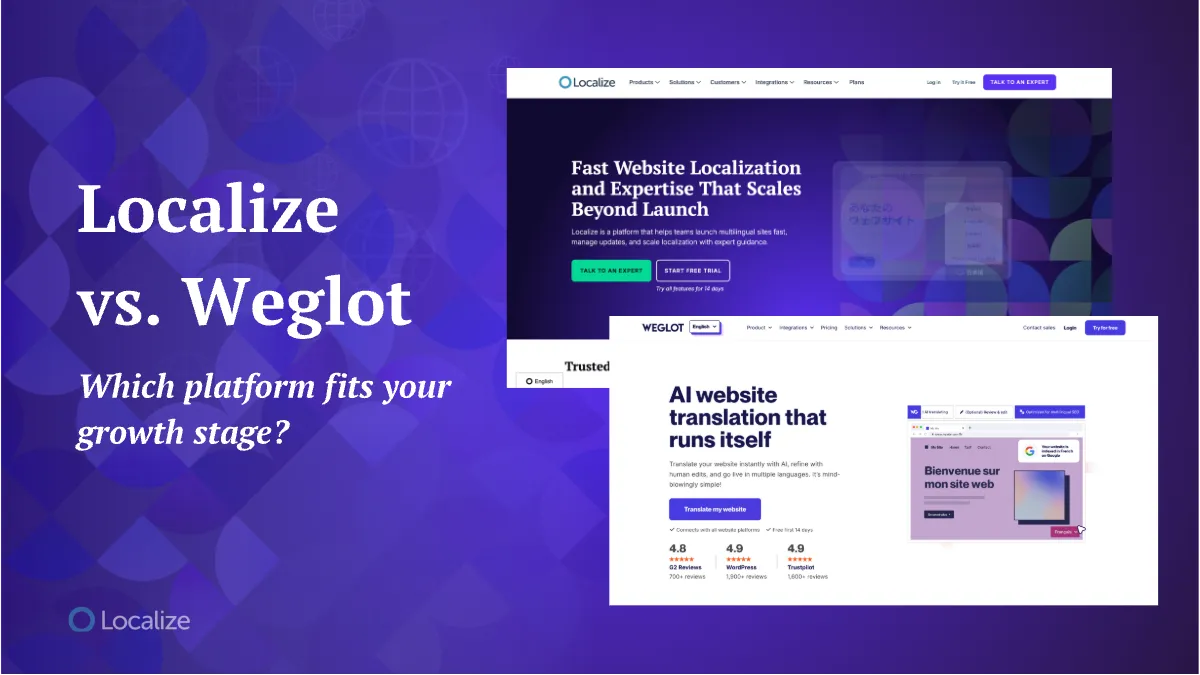
Weglot is a genuinely strong tool for a first localization project. Localize is built for what comes next: a SaaS company that has outgrown a bolt-on translation layer and needs a website localization platform with real workflow control, broader content coverage, and pricing that scales with the business, not against it.
That's the real decision behind Localize vs. Weglot. This guide lays out where Weglot earns its popularity, exactly where SaaS teams hit its ceiling, what Localize does differently, and which one fits where your team is right now.
What Weglot does well (and who it's built for)
Weglot earns its popularity honestly. A reverse-proxy setup means Weglot's servers detect and serve translated pages without touching your codebase, so there's no engineering lift to get started. The WordPress plugin, along with 70-plus other native integrations, installs in minutes. Weglot holds a 4.7 rating on G2 across roughly 700 reviews, plus strong marks on Trustpilot and the WordPress plugin directory. Reviewers consistently point to two things: setup takes almost no effort, and the visual, in-context editor makes fixing a translation as simple as editing the live page.
For a small business translating a marketing site or storefront into one or two languages for the first time, that's a genuinely reasonable choice. You don't need a developer, a sales call, or a formal localization program. You need a script tag and an afternoon, and Weglot's free plan (2,000 words, one language) or entry-level Starter tier are built for exactly that scope.
Where Weglot hits a ceiling as you scale
The same architecture that makes Weglot fast to start also sets the limits that a growing SaaS company eventually runs into.
Because Weglot works as a reverse proxy, Weglot's own infrastructure serves your translated pages before they reach your visitors. That adds a layer between your site and your visitors, which can affect load times, and it hands over a degree of direct control over how translated pages render and get indexed for technical SEO. For a five-page marketing site, that tradeoff barely registers. For a product with dozens of dynamic pages and strict SEO requirements, it starts to matter.
Weglot meters pricing by word count in discrete tiers, so a site can jump tiers in a single billing cycle. A site that outgrows the $32-a-month Business tier can land in the $329-a-month Advanced tier the moment a new language or a content push crosses the word count line, more than 10 times the cost for the same product, just more of it. That's simple to price when you're translating one marketing site. The growth that triggers the jump (a new market, a bigger content library) is exactly the growth a scaling SaaS company is trying to create, and the pricing model doesn't flex to meet it.
Weglot is designed for marketing pages and storefronts first. In-app strings, help center articles, and other product content aren't its focus. And there's no built-in review layer for a team that now owns quality as well as output. There's no version control and no structured QA workflow standing between an AI-generated translation and what ships. For one person managing one site, that's rarely a problem. For a team running a growing SaaS localization program, quality control becomes something you have to build manually.
Support follows a similar pattern. Weglot's self-serve tiers handle straightforward questions well, and G2 reviewers back that up. But prospects and customers who've used Weglot before coming to Localize describe a different experience once a question gets technical or an account gets more complex: support that's slower to resolve once a simple ticket isn't enough. Translation output needs the same kind of scrutiny at scale. Reviewers note glitches and inconsistent results that need manual correction, manageable on a small site, but real ongoing work once volume and language count grow.
What Localize does differently
Localize skips the proxy layer entirely. Translations run through a direct JavaScript integration, so content gets detected and delivered straight from your own site. Nothing routes through a third party's servers first, which is the direct fix for the rendering-control and load-time concerns a proxy setup introduces.
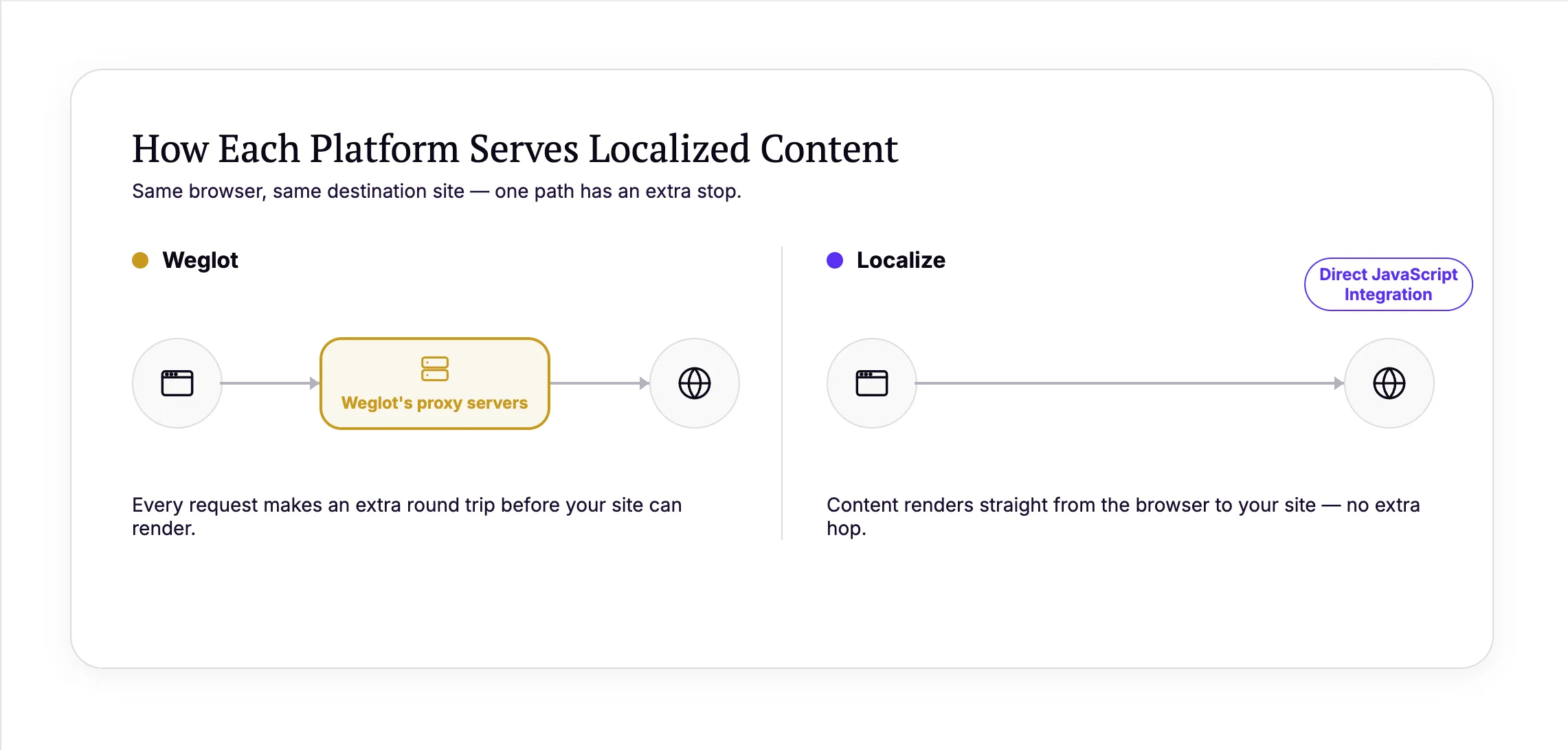
Localize covers more than the marketing site. Localize translates web apps, product interfaces, documents, and websites, all inside one system, which matters once translation needs stretch beyond the pages Weglot was built for. A SaaS company running a marketing site, an in-app experience, and a documentation library no longer needs three separate translation workflows to keep them all current.
Localize tailors your plan to your needs: content volume, number of languages, and workflow complexity are all taken into consideration, which keeps cost predictable as a program scales. The curve flattens as volume grows. A Localization Expert scopes your plan around where your program is headed, then helps your team set up Translation Memory, glossary enforcement, and defined variables, so content that's already been translated doesn't get billed again. AI translation quality scoring flags weak output before it ships, and reviewer workflows give a team an actual sign-off step on what goes live.
Picture a SaaS company adding a fourth language while its help center doubles in the same quarter. On Weglot, that combination is exactly what pushes a site past a pricing tier, sometimes without warning. On Localize, that growth gets scoped into the account ahead of time, and Translation Memory reuse cuts how much of the new content actually needs fresh translation, so the plan already accounts for it.
Weglot is built to run without anyone from the vendor in the room: connect the integration, and the platform handles the rest from there. Localize takes a different approach for teams past that stage. Every account gets a Localization Expert who helps map content volume, workflow needs, and rollout priorities before a plan is even quoted, then stays involved through implementation and as the program adds markets. That's a different kind of support than a self-serve tool offers: someone who has run localization programs before, helping decide which market to prioritize next or how to structure a review workflow, not just a ticket queue for when something breaks.
That relationship doesn't end at launch. As a team adds a market or a new content type, the same Localization Expert flags what's likely to cause problems before it does, whether that's a workflow that won't hold up with a fourth reviewer in the mix or a glossary gap that'll surface the moment technical documentation enters the pipeline.
What changes when more than one person owns localization
Once a marketing manager, a product manager, and a support lead all have a stake in what gets translated, informal review stops working. Localize adds the infrastructure a growing team actually needs. Task management and project tracking make sure nothing gets missed during a handoff. Version control protects an approved translation from getting overwritten by a later content change. Single sign-on (SSO) and SAML (Security Assertion Markup Language) authentication manage access as the team scales. Advanced permissions and an audit log make it clear who approved what. None of that matters when one person runs one site. All of it matters once localization is a program with more than one owner.
Localize vs. Weglot, side by side
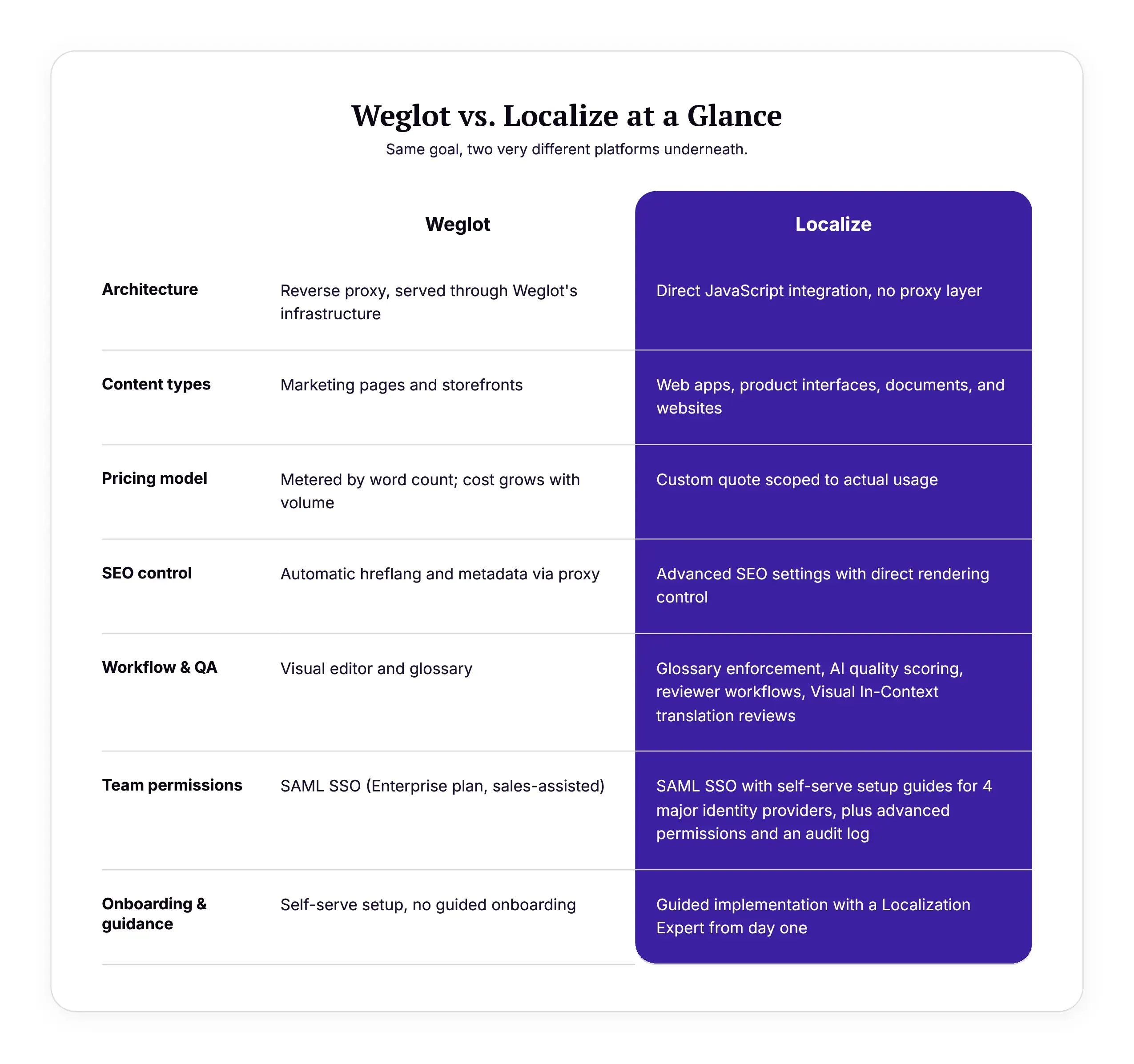
It comes down to the same tradeoff every time: Weglot optimizes for getting started, Localize optimizes for staying in control as things grow. Skim it alongside the friction points above, then head to the verdict below.
Which one should you choose?
The Localize vs Weglot decision usually comes down to one of two situations. Choose Weglot if this is your first localization project: a single marketing site or storefront going into a single language that also has content that doesn't change more than once or twice a year. It's a good, low-risk way to find out whether international traffic converts before you invest further.
Choose Localize if you're already localizing and hitting the ceiling described above: content beyond marketing pages, more markets planned over the next 12 to 24 months, more than one team that needs a say in what ships, a translation bill that's stopped being predictable, or support that can't keep pace once your questions get technical. Once cost predictability and workflow control matter as much as the translation itself, a bolt-on tool stops being enough.
If you're evaluating a Weglot alternative because you've hit one of those walls, that's not a failure of your first choice. It's a sign your localization program outgrew the tool built for starting one.
What it looks like when a SaaS company scales past a bolt-on tool
A few SaaS teams have already made this move.
Tabist, a Tokyo-based travel brand, took its site from one language to five with Localize and saved an estimated 1,500 hours of manual translation work, building a glossary early and using Localize's defined-variables feature to cut down on repetitive phrase review. Its Chinese-language market saw a 38% increase in purchases; its Korean-language market saw purchases double. Mimeo Digital launched its content platform in 15 languages without pulling its engineering team off other roadmap priorities, using Localize to keep a fast-changing product catalog current across every market. Submittable, a social impact platform with dynamic, customer-specific application content, translated its web app into 20-plus languages, built in safeguards to keep sensitive applicant data out of the translation pipeline, and cut human translation costs by more than 40% along the way.
What they have in common is the pattern that matters here: a SaaS company that needed more than a marketing-site translation layer, and found the workflow and content coverage to support it as the program grew.
The right localization tool changes as your team does. Outgrowing the first one is a sign of growth, not a mistake. If your SaaS company is hitting the ceiling described above, talk to a Localization Expert about how Localize handles the markets and content types you're scaling into.
For a broader framework on building a program that scales, get the Website Localization Playbook.